> For the complete documentation index, see [llms.txt](https://howto.indexify.finance/llms.txt). Markdown versions of documentation pages are available by appending `.md` to page URLs; this page is available as [Markdown](https://howto.indexify.finance/indexify/discover/viewing-stacks.md).
# Viewing Stacks
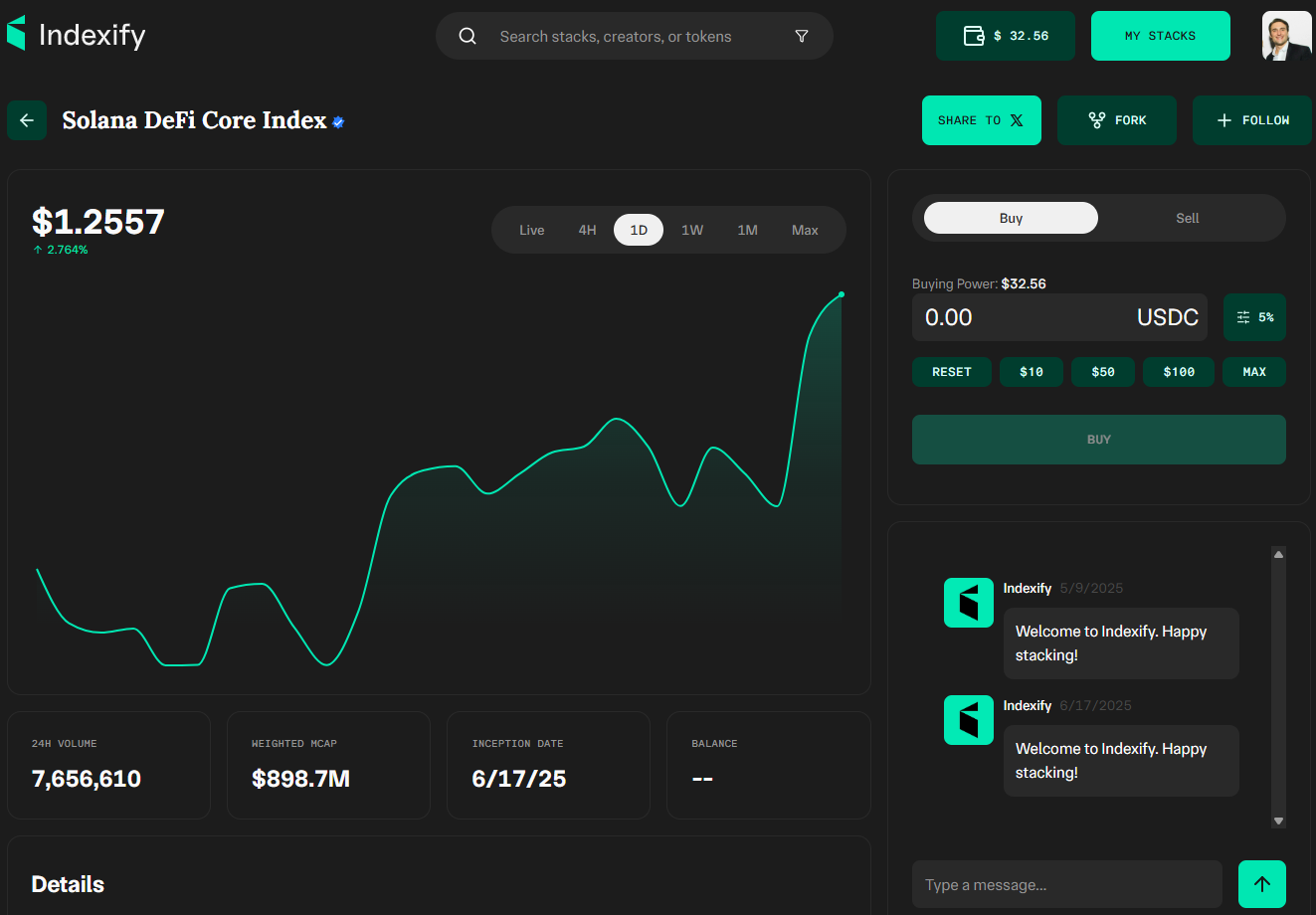
Each stack page provides a complete overview of performance, trading options, and its underlying tokens.
#### Header / Navigation
* **Index Name & Title** → e.g., *“Solana DeFi Core Index”*
* **Search Bar** → Search for stacks, creators, or tokens
* **User Controls** → Balance display, *My Stacks*, profile, share, fork, follow
#### **Performance**
* **Performance Chart**
* **Price Display** → Current index price + % change
* **Chart View** → Toggle between timeframes: *Live, 4H, 1D, 1W, 1M, Max*
#### **Metrics**
* 24H Trading Volume
* Weighted Market Cap
* Inception Date
* User Balance
#### **Trading Panel**
* **Buy / Sell Toggle**
* **Buying Power** → Available balance in USDC
* **Input Section** → Set trade size (manual entry or presets: $10, $50, $100, Max)
* **Action Buttons** → Buy / Sell execution
#### **Community / Activity**
* **Chat / Message Feed** → Displays updates, welcome messages, and user discussions
#### **Details Section**
* **Description** → Overview of what the stack represents (e.g., *“Top DeFi protocols driving trading, liquidity, and yield on Solana”*)
* **Creator Info** → Profile, # of stacks created, follower stats
* **Risk Label** → e.g., *Low / Medium / High Risk, Long / Short Term*
## Token Allocation
Each stack displays a breakdown of the tokens that make up the index.
***
#### **Allocation Breakdown**
* Visual chart showing % distribution across tokens
#### **Token Table**
Columns typically include:
* **Name / Symbol**
* **Allocation %**
* **Market Cap**
* **Average Price**
* **Current Value**
* **User Holdings** (if any)
* **24H Performance**
***
✅ **Tip**\
Use the Allocation Breakdown to quickly see which tokens drive the stack’s performance.
---
# Agent Instructions
This documentation is published with GitBook. GitBook is the documentation platform designed so that both humans and AI agents can read, navigate, and reason over technical content effectively. Learn more at gitbook.com.
## Querying This Documentation
If you need additional information that is not directly available in this page, you can query the documentation dynamically by asking a question.
Perform an HTTP GET request on the current page URL with the `ask` query parameter, and the optional `goal` query parameter:
```
GET https://howto.indexify.finance/indexify/discover/viewing-stacks.md?ask=&goal=
```
`ask` is the immediate question: it should be specific, self-contained, and written in natural language.
`goal` is optional and describes the broader end goal you are ultimately trying to accomplish on behalf of the user. GitBook uses it to tailor the answer towards what is most useful for that goal.
The response will contain a direct answer to the question and relevant excerpts and sources from the documentation.
Use this mechanism when the answer is not explicitly present in the current page, you need clarification or additional context, or you want to retrieve related documentation sections.